Alle Rechte vorbehalten · Debian · Ubuntu · Mint · MX · auch ohne systemd ·
Fassung 2.8
All rights reserved · Debian · Ubuntu · Mint · MX · works without systemd ·
Version 2.8
Worum geht es? — in einfachen Worten
What is this about? — in plain words
Jedes Werkzeug für diese Aufgabe ist ein Laden. Ein Laden ist dafür
gebaut, dass man etwas holt. Das Wegräumen versteckt sich dort hinter einem Wort in
einer Liste, irgendwo zwischen „Büro“, „Grafik“ und „Spiele“.
Every tool for this job is a store. A store is built for getting
something. Removing hides behind one word in a list, somewhere between “Office”, “Graphics”
and “Games”.
Wer aufräumen will, denkt aber andersherum: Was habe ich, und was brauche
ich nicht mehr? Dieses Programm dreht die Richtung um — es öffnet direkt in die Liste
dessen, was da ist, und hat nur diesen einen Zweck.
But someone tidying up thinks the other way round: what do I have, and what
do I no longer need? This program turns the direction around — it opens straight into a
list of what is there, and does one thing only.
Und es passt auf. Ein Programm zu entfernen kann anderes mitreißen — im
schlimmsten Fall die eigene Arbeitsoberfläche oder das Terminal. Was deine Sitzung trägt,
misst das Programm auf deinem Rechner, nicht anhand einer eingebauten Liste. Deshalb
hält der Schutz auch auf einem Computer, den niemand von uns je gesehen hat.
And it watches out. Removing one program can drag others along — in the worst
case your desktop or your terminal. Whatever your session depends on is measured on your
machine, not read from a built-in list. That is why the protection also holds on a
computer none of us has ever seen.
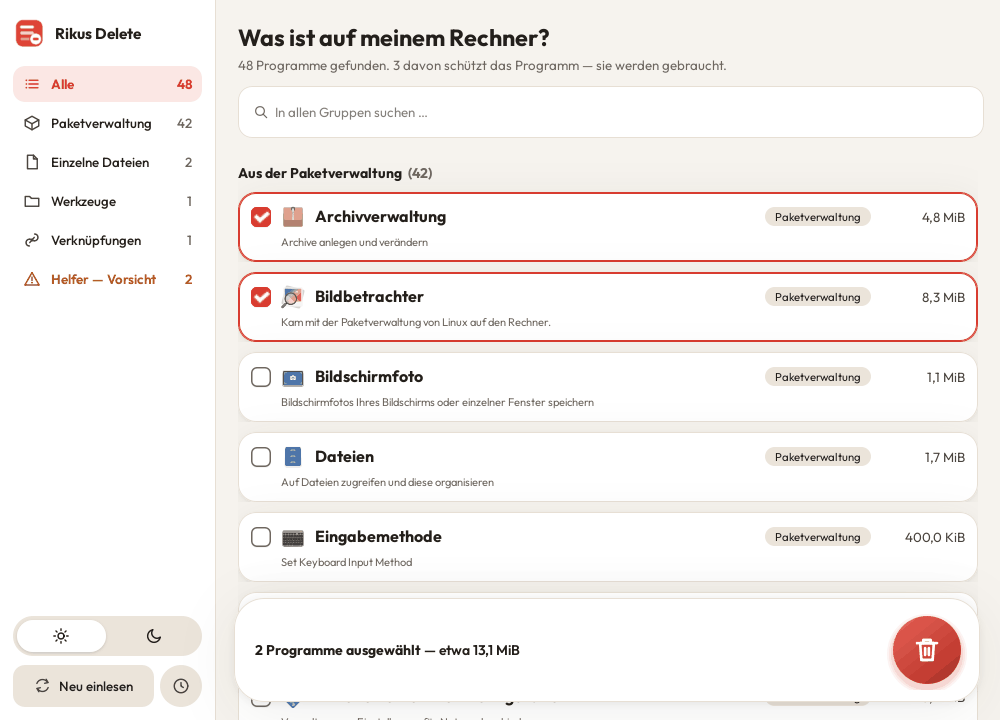
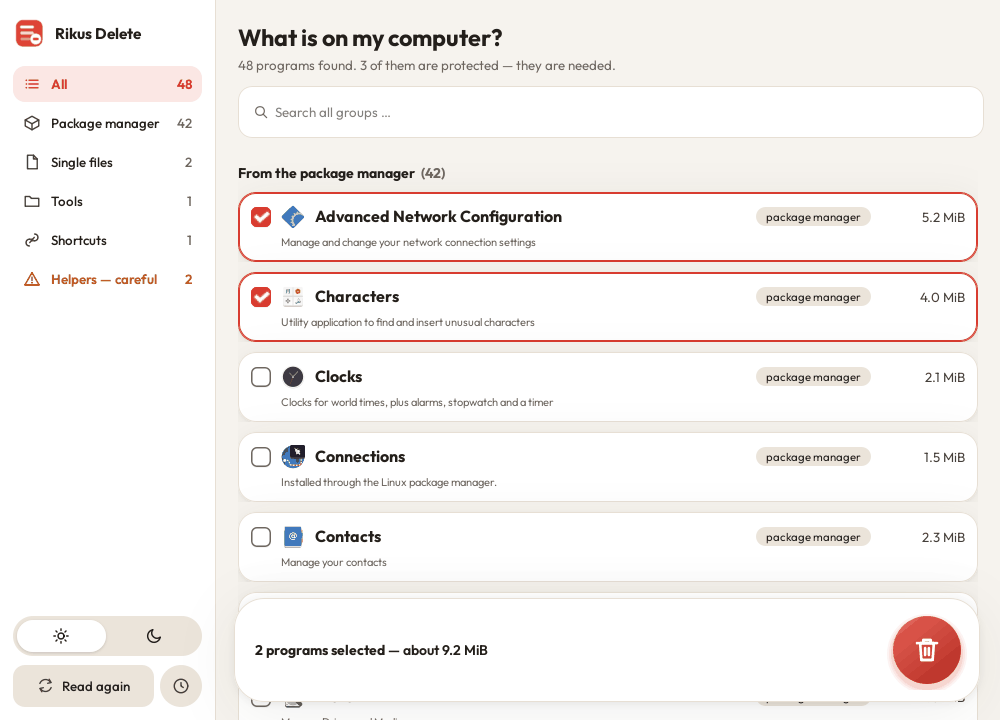
So sieht es aus: links die Gruppen mit ihrer Zahl, in der Mitte deine Programme als Karten — angehakt ist, was weg soll.This is what it looks like: the groups with their counts on the left, your programs as cards in the middle — ticked is what should go.
Das kann es — auf einen Blick
What it can do — at a glance
Programme wieder loswerden — und vorher sehen, was wirklich verschwindet.
Get rid of programs again — and see beforehand what really disappears.
Erst zeigen, dann entfernen. Unter Was ist auf meinem Rechner? steht alles Installierte — mit Namen, den du kennst, nicht mit Paketnamen.
Vor dem Entfernen steht im Klartext, was passiert: welche Programme verschwinden, was an Beiwerk mitgeht, weil es sonst niemand mehr braucht — und das alles, bevor das Passwort kommt.
Es hält dich davon ab, dir den Rechner kaputtzumachen. Hängt daran deine Arbeitsoberfläche oder braucht Linux es zum Starten, sagt es das deutlich, statt es einfach zu tun.
Es weiß, woher jedes Programm kam — aus der Paketverwaltung, als Flatpak, als Snap, als AppImage, über npm oder von Hand abgelegt — und entfernt es auf dem richtigen Weg.
Reste aufräumen. Was nach dem Entfernen liegen bleibt, wird gezählt und auf Wunsch mit weggeräumt.
Es prüft nach. Hinterher steht da, wie viel wirklich weg ist und was noch da ist — statt einer Erfolgsmeldung ins Blaue.
Es sagt dazu, wenn dein Rechner ein Programm von selbst startet — damit du weißt, was im Hintergrund mitläuft, bevor du es entfernst.
Hell oder dunkel, deutsch oder englisch — richtet sich nach deinem System.
Show first, remove second.What is on my computer? lists everything installed — under the name you know, not the package name.
Before removal it says in plain words what will happen: which programs disappear, what extras go with them because nothing else needs them — all of it before the password is asked for.
It stops you from breaking your machine. If your desktop depends on it, or Linux needs it to start, it tells you clearly instead of just doing it.
It knows where each program came from — package manager, Flatpak, Snap, AppImage, npm or placed by hand — and removes it the right way.
Clean up leftovers. Whatever remains after removal is counted and cleared away on request.
It checks afterwards. You are told how much is really gone and what is still there — instead of a success message into the blue.
It tells you when your computer starts a program by itself — so you know what runs in the background before you remove it.
Light or dark, German or English — following your system.
Die eigene Paketquelle
Our own package source
Einmal eintragen — und jede neue Fassung kommt von selbst.
Set it up once — every new version then arrives on its own.
Bisher musstest du für jede neue Fassung wieder auf diese Seite kommen und die
Datei von Hand holen. Ab Fassung 2.2 geht es auch anders: Rikus Delete hat eine
eigene Paketquelle. Das ist dieselbe Technik, mit der dein System auch alle anderen
Programme aktuell hält. Du trägst sie einmal ein — danach erscheint jede neue Fassung
ganz normal bei deinen Systemaktualisierungen, ohne dass du etwas tun musst.
Until now you had to come back to this page for every new version and fetch the
file by hand. From version 2.2 there is another way: Rikus Delete has its
own package source. It is the same technique your system uses to keep all other
programs current. You add it once — after that every new version simply shows up with
your normal system updates, with nothing left for you to do.
Schritt 1 — den Schlüssel holen. Damit erkennt dein Rechner, dass die
Pakete wirklich von uns kommen und unterwegs niemand etwas verändert hat. Auf frisch installierten Rechnern fehlt oft das kleine Programm curl – der Befehl holt es gleich mit:
Step 1 — get the key. With it your computer can tell that the packages
really come from us and that nobody changed anything on the way. Freshly installed computers often lack the small program curl – the command installs it first:
Schritt 2 — die Quelle eintragen. Eine einzige Zeile, die deinem System
sagt, wo es nachschauen soll:
Step 2 — add the source. One single line telling your system where to
look:
echo "deb [signed-by=/etc/apt/keyrings/rikus.gpg] https://apt.rikus.info stable main" | sudo tee /etc/apt/sources.list.d/rikus.list
Schritt 3 — einspielen.
Step 3 — install.
sudo apt update && sudo apt install rikus-delete
Beim ersten Start fragt das Programm nach deinem Freischaltcode. Den
bekommst du kostenlos über den Knopf oben auf dieser Seite — Name, E-Mail, Land, und der Code
kommt sofort per Mail. Er wird einmal eingetippt und danach nie wieder verlangt.
On first start the program asks for your unlock code. You get it free of
charge using the button at the top of this page — name, e-mail, country, and the code arrives
by mail at once. You type it once and are never asked again.
Wenn du das Programm schon hast: Du musst nichts neu installieren. Trage
die Quelle ein wie oben, und die neue Fassung wird dir als ganz normales Update angeboten —
auch von Rikus Updateall. In derselben Quelle liegen auch Rikus Software, Rikus Cleanup und Rikus Updateall.
If you already have the program: nothing needs reinstalling. Add the
source as shown above and the new version is offered to you as an ordinary update — including
by Rikus Updateall. The same source also carries Rikus Software, Rikus Cleanup and Rikus Updateall.
Beim Aktualisieren im Terminal wird rikus-delete „zurückgehalten“? Das kann
vorkommen, wenn du Delete in einer Fassung bis 2.3 hast. Mit diesem Befehl kommt die neue Fassung an:
Updating in the terminal says rikus-delete was “kept back”? This can happen
if you have Delete in a version up to 2.3. This command brings the new version:
sudo apt update && sudo apt install rikus-delete
Du willst die Quelle wieder loswerden? Zwei Zeilen, und alles ist wie
vorher — das Programm selbst bleibt installiert:
Want to remove the source again? Two lines and everything is as before —
the program itself stays installed:
Es bricht mit einer Meldung über Abhängigkeiten ab? Das passiert auf Debian 13 und LMDE 7, wenn dort das Zusatzlager backports eingeschaltet ist und schon Pakete daraus benutzt werden, zum Beispiel für Hyprland. Dann passen zwei Bausteine nicht zusammen. So klappt es:
It stops with “unmet dependencies”? This happens on Debian 13 and LMDE 7 when the backports repository is switched on and packages from it are already in use, for example for Hyprland. Then two building blocks do not fit together. This works:
sudo apt install -t trixie-backports rikus-delete
Was es kann
What it does
Elf Dinge, die den Unterschied machen.
Eleven things that make the difference.
Die Liste, nicht der Laden
A list, not a store
Beim Öffnen steht sofort da, was auf deinem Rechner ist. Kein Stöbern, kein Katalog — nur deine Programme.
It opens straight into what is actually installed. No browsing, no catalogue — just your programs.
Die Namen aus dem Startmenü
The names from your menu
Da steht „Bildbetrachter“, nicht „xviewer“. So heißt es auch in deinem Menü — du erkennst es wieder.
It says “Image Viewer”, not “xviewer” — the same name your menu shows.
Alles an einem Ort
Everything in one place
Paketverwaltung, Flatpak, Snap, AppImage, npm und von Hand abgelegte Programme stehen in derselben Liste. Du musst nicht wissen, woher etwas kam.
Package manager, Flatpak, Snap, AppImage, npm and hand-placed programs all in the same list. You need not know where something came from.
Auch was im Menü fehlt
Even what has no menu entry
Werkzeuge für die Befehlszeile stehen in keinem Startmenü — kein anderes Programm zeigt sie dir. Hier stehen sie mit ihrem Platzbedarf.
Command-line tools appear in no application menu, so nothing else on your machine ever shows them. Here they are, with the space they take.
Vorschau vor dem Passwort
Preview before the password
Bevor irgendetwas passiert, steht in normalem Deutsch da, was verschwindet und wie viel Platz frei wird.
Before anything happens, a plain-language preview says what will go and how much space is freed.
Deine Oberfläche kann nicht weg
Your desktop cannot go
Was deinen Bildschirm trägt, wird auf deinem Rechner gemessen — und lässt sich gar nicht erst ankreuzen.
Whatever your screen depends on is measured on your machine — and cannot even be ticked.
Was mitgeht, wird genannt
What comes along is named
Programme hängen aneinander. Zieht deine Auswahl noch etwas mit, steht es einzeln da — vorher, nicht hinterher.
Programs depend on each other. Anything pulled along is listed individually — beforehand, not afterwards.
Zahlen aus dem Trockenlauf
Figures from a dry run
Die angezeigte Größe ist keine Schätzung. Sie kommt aus einem Probelauf und lässt sich einlösen.
The size shown is not an estimate. It comes from a dry run and can actually be redeemed.
Es wird mitgeschrieben
It is written down
Was du entfernt hast, steht in einer Liste — samt dem Befehl, mit dem du es zurückholst.
What you removed is kept in a list — including the command to get it back.
Hell und Dunkel
Light and dark
Zwei Knöpfe unten links schalten um. Die Wahl wird gemerkt.
Two buttons at the bottom left switch over. Your choice is remembered.
Deutsch oder Englisch
German or English
Die Oberfläche richtet sich nach der Sprache deines Systems.
The interface follows your system language.
So geht's
How to install
Der einfache Weg: Auf „Kostenlos anfordern“ klicken und die Datei
anschließend doppelt anklicken. Die Software-Verwaltung deines Systems öffnet sich
und installiert das Programm.
The simple way: click “Get it free” and then double-click the file.
Your system's software installer opens and installs the program.
Danach steht Rikus Delete im Startmenü unter „System“.
After that Rikus Delete appears in your application menu under
“System”.
Voraussetzungen:python3, python3-gi,
python3-gi-cairo, gir1.2-gtk-3.0, dpkg, apt, coreutils,
desktop-file-utils und pkexec —
auf Debian, Ubuntu, Mint und MX praktisch immer vorhanden; apt holt alles
Fehlende automatisch mit. pkexec ist die Passwortabfrage,
desktop-file-utils frischt nach dem Aufräumen das Startmenü auf. systemd wird nicht vorausgesetzt. Flatpak, Snap und
npm sind freiwillig: Sind sie da, erscheinen sie in der Liste — fehlen sie,
fehlt einfach dieser Teil. Keines davon wird mitinstalliert, denn niemand soll
etwas dazubekommen, nur um etwas loszuwerden.
Requirements:python3, python3-gi,
python3-gi-cairo, gir1.2-gtk-3.0, dpkg, apt, coreutils,
desktop-file-utils and pkexec —
present on virtually every Debian, Ubuntu, Mint and MX system; apt fetches
anything missing automatically. pkexec is the password prompt,
desktop-file-utils refreshes the start menu after cleaning up. systemd is not required. Flatpak, Snap
and npm are optional: if present they appear in the list, otherwise that part
is simply absent. None of them is pulled in — nobody should have to gain something
in order to get rid of something.
Einmal anmelden — der Code kommt sofort per E-Mail.Sign up once — the code arrives by e-mail at once.
☕ Wenn es dir geholfen hat☕ If it helped you
Dieses Programm kostet nichts und wird auch nie etwas kosten. Ich baue es in meiner Freizeit. Wenn es dir Arbeit erspart hat und du magst, freue ich mich über einen Kaffee — und wenn nicht, ist das genauso in Ordnung.This program is free and always will be. I build it in my spare time. If it saved you some work and you feel like it, I would be glad about a coffee — and if not, that is just as fine.